
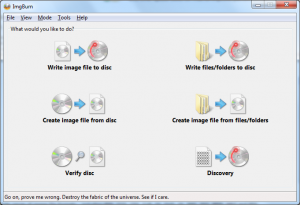
Use ImgBurn to create ISO files to CD, DVD or Blue-Ray media with this free software.

ImgBurn – Freeware Burning software
ImgBurn is a nice little freeware program that lets you burn ISO, DVD and Blu-ray disc nice and easily. It does not require a lot of disk space and it is easy to use. It can pretty much do everything that most people need form a burning program. The software support lots of formats including BIN, CCD, CDI, CUE, DI, DVD, GI, IMG, ISO, MDS, NRG.
Image burn is great if you need to work with ISO files. Whatever you need to burn an existing ISO file or you need to create your own ISO files ImgBurn is up for the task. Of cause it can also burn an ordinary data disk if that is what you need.
🔑 Key Facts About ImgBurn
- Developer: Created by LIGHTNING UK!
- First Release: October 4, 2005
- Latest Stable Version: 2.5.8.0 (released June 16, 2013)
⚙️ Main Features
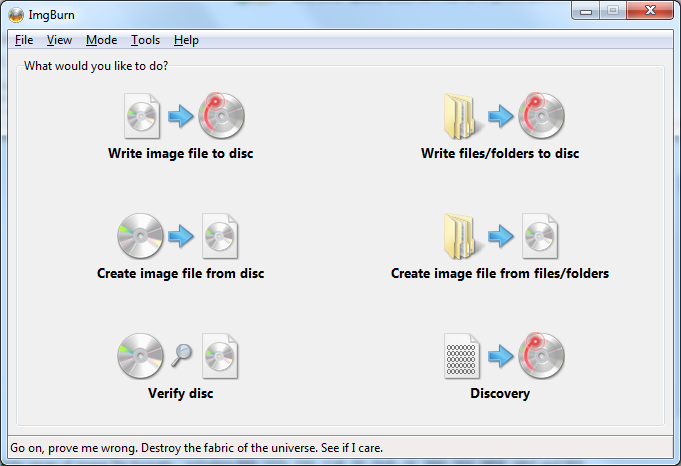
ImgBurn operates in different modes, each designed for a specific task:
- Read Mode: Copy a disc to an image file (ISO, BIN, etc.).
- Build Mode: Create an image file from files/folders on your computer, or write them directly to a disc.
- Write Mode: Burn an image file to a disc.
- Verify Mode: Check if a disc is fully readable and optionally compare it against an image file.
- Discovery Mode: Test your drive/media performance and quality.
Language Packs
ImgBurn is available in many different language. All you need to do, is to download the language pack you want and copy it to the location of the language packs (e.g. C:\Program Files (x86)\ImgBurn\Languages). Extract the zip file containing the translation file and startup ImgBurn again. You can now switch language under Tools -> Settings -> Language.
On their website you can also find forums, guides and reviews about the software.
Leave me a commend below about ImgBurn
Feel free to leave me a comment or an question about ImgBurn below and let me hear what you think.

Very handy, I have some CDs that I need to back up somewhere digitally in case the disk gets damaged such as Software CD’s and family CD’s with photos and video in them.
Thanks for the nice share