With Digicert you can easily handle your SSL certificates for your website, blog or other devices? With this little free tool, it is easy to manage tour SSL ceritificates.
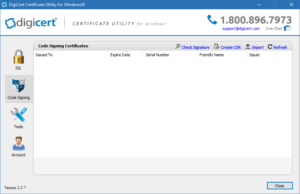
Digicert Utility for Windows
Configuring SSL certificates can be a tricky process. That is why I would like to introduce you to this nice little tool from DigiCert. It is completely free and can help you with a lot of the tasks involving buying and installing a SSL certificate in your environment.
Why is SSL certificate important?
A SSL certificate is more that just a technical requirement. In addition it’s a cornerstone when it come to trust and security on the web. Here’s why it matters:
-
- 🔒 Data Encryption
SSL ensures that sensitive information (like login credentials, payment details, or personal data) is encrypted during transmission, preventing hackers from intercepting it.
- ✅ Authentication & Trust
Certificates verify that your website is genuinely yours, not an imposter site. Visitors see the padlock icon in their browser, which builds confidence. - 🌐 Compliance & Standards
Many regulations (such as GDPR and PCI DSS) require secure data handling. SSL helps meet these compliance standards. - 🚀 SEO Benefits
Google and other search engines prioritize HTTPS websites in rankings. Without SSL, your site may be penalized or flagged as “Not Secure.” - 📈 User Experience
Modern browsers warn users when a site lacks SSL. This can drive visitors away instantly. A valid certificate reassures them and keeps them engaged

Features of Digicert Utility
With this free tool from Digicert, you can do most of the tasks that is involved in working with certificates. You can test SSL certificates, prepare CSR for ordering certs, verifying certificate chains and a lot more. Most importantly, here are the key features you’ll benefit from.
- Install certificates with a single click
- Generate a CSR for your SSL order
- Re-install certificates in one click
- Find SSL Certificates on your server
- Edit certificate friendly names
- Test certificates
- Verify signed applications
- Sign or re-sign code or software
- Export a Certificate (Windows .pfx)
- Export a Certificate (Apache .pem)
Create SSL CSR with this Tool
When you order a SSL certificate you need to create a CSR before ordering your new certificate. In fact, creating a CSR with DigiCert takes just three straightforward steps.
1. First click the Create CSR button as below.

2. Fill out the information for the domain you need a SSL certificate for.

3. Copy CSR and paste it in the order form of your SSL provider to complete your SSL order.


Download free tool from Digicert
Download the free Digicert Utility. Furthermore, check out my Tools Category here for more cool tools at my blog.
However, if you don’t want to install a program or maybe are prohibited by company policy, there is an online alternative, that can do many of the same thing. The alternative is named SSLShopper and this online tool is very useful too.