What is Microsoft Azure and what is it used for. I will try to explain to you in this post.
What is Microsoft Azure
You might have heard about Azure or you might rely on it every day, without knowing it. Azure is Microsoft’s cloud services. It is one of the biggest players in the cloud market. Microsoft have datacenters all over the world, but is so much more than just that. If your company is using Office 365 as your e-mail provider and OneDrive for your files, it is all located in one of Microsoft’s global datacenters. If you are using Microsoft Teams for business meetings, you are also using Azure services. Azure is also hosting millions of apps and services that you might be using in a daily basis.
Microsoft Azure was officially launched on February 1, 2010, under the name: “Windows Azure”. It was rebranded to “Microsoft Azure” back in March 2014.
Azure Cloud service models
Like most other cloud solutions, Microsoft Azure, divide their cloud services into 3 models. Depending on your needs, you should select the model that fit your needs. Don’t worry, you can mix the service models just like you need.
- Infrastructure as a Service (IaaS)
- Platform as a Service (PaaS)
- Software as a Service (SaaS)
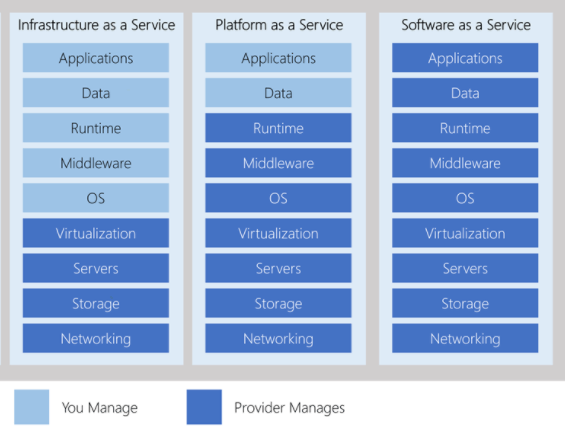
Infrastructure as a Service (IaaS)
IaaS is the most flexible cloud service model, giving you maximum control over your computing resources. With IaaS, the cloud provider handles the physical infrastructure — including servers, networking, and data center security — while you manage the operating systems, applications, and configurations.
Example: Running a Virtual Machine in an Azure datacenter is a classic IaaS use case.
Platform as a Service (PaaS)
PaaS sits between IaaS and SaaS, offering a balanced approach. You don’t need to worry about hardware, networking, or operating systems — the cloud provider takes care of those. Instead, you focus on building and deploying your applications.
Example: Azure App Service or Logic Apps allow developers to create and run apps without managing the underlying infrastructure.
Software as a Service (SaaS)
SaaS is the most complete and user-friendly model. You simply use a fully developed application hosted in the cloud — no setup, no maintenance. The provider handles everything from infrastructure to updates.
Example: Microsoft 365 (formerly Office 365) is a widely used SaaS solution, offering email, collaboration tools, and productivity apps to millions of users worldwide.
Microsoft Global Datacenters
Microsoft have datacenters all over the world. This makes sure that you can have high arability on your services, but still have low latency to your data in the cloud. Below you can see where the datacenter of Microsoft Azure is located. Microsoft are stilling building new datacenters, that pops up in regions all over the world.
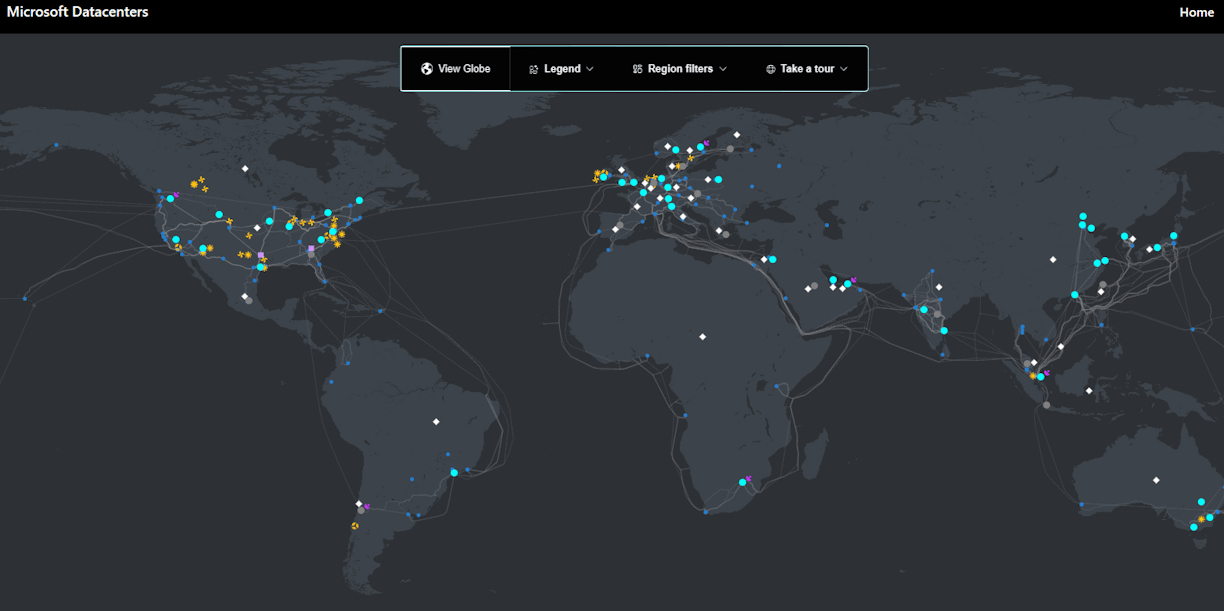
If you click on the link below, you can explore the map over Microsoft Azure’s datacenter, worldwide. You can also see where Microsoft is planning new datacenters.
Navigate Azure global infrastructure yourself
Check latency to all datacenters in Azure
If you want to know more about Microsoft Azure, you should take a look at Microsoft Azure Blog
Are you using Microsoft Azure?
Are you using Azure in your business and for what? You might relay on azure services without knowing it. I would love, if you would leave me a comment or question below.