

In this post I will help you with tips, tricks and tools to speed up your WordPress site.
Why is speed important for a WordPress site
There are many good reasons to make your WordPress blog perform and load as fast as possible. First, users don’t want to wait. If your site does not load within a couple of seconds, they hit the back button and find another site that does load fast. Second, Google also favors site that load quickly. This is nothing new, but not all is aware of this factor. If you want to rank high and want people to visit your site or blog, it has to be fast. A slow site means lower rankings, fewer visitors, and fewer conversions.

How can you speed up your WordPress Blog
In fact there is a lot of things you can do to speed up your site. You can select a fast (Read expensive) hosting Provider, you can use a modern caching plugin, remove unused/bad plugins and you can optimize images on your site. This is all things that can help you archive your blog to load faster and attract more users.
Measure Your Current Speed (Before You Touch Anything)
Before you start with anything at all, make sure that you have a fresh backup. This is always a good place to start when making big changes to your site.
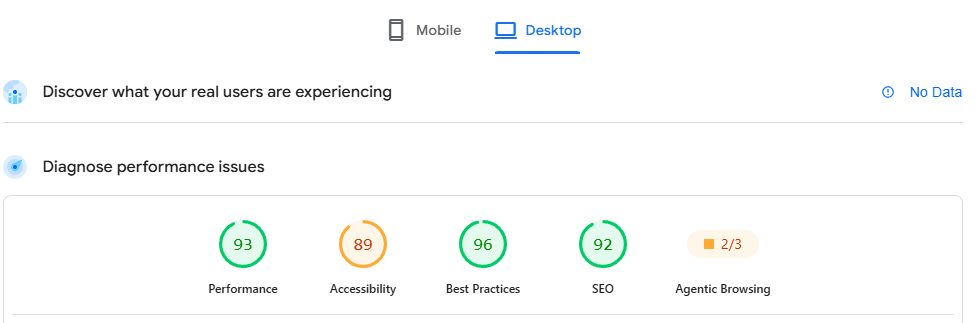
Next thing, I would to make a speed test to check how things looks before making any changes. This is important to make sure that your changes actually makes your blog faster and not the other way around. There is many tools out there to check your performance. I would recommend PageSpeed Insights from Google, that are completely free to use. A result could look something like on the image below. Be aware, that there is a test for both Mobile and for Desktop. Performance score might be different on mobile and Desktop.
Reduce load time Speed with Image Optimization
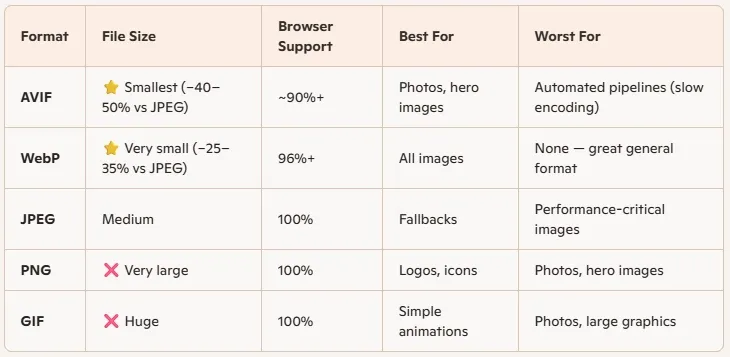
High resolution images make a website or a blog look great, but it can also really kill performance. You need to be aware of which image format you are using and how big your pictures actually are. You might want to use avif or webp format over jpeg or png format. It is not about lower the look or quality of your images. It is more about choosing the right file type for the task and use tools to compress your images to improve load time. One of the tools I have been using for years is Imagecompressor. It is free and easy to use and can make a big impact. Often I get a compressing rate on more than 50%.
If you don’t want to handle all your images yourself there are plugins to make all the hard work. One of them is Smush. It can handle all the work for you inside WordPress
Install a Modern Caching Plugin
One thing that really can boost the performance to your site is by using a modern Caching Plugin. There are many caching plugin out there for WordPress. Some of the most used are: LiteSpeed Cache, WP Rocket and W3 Total Cache. On this blog right now I am using W3 Total Cache as my caching plugin. It is one of the best thing I have done for performance on my blog. If you don’t believe me, try and run a speed test before and one after you install it. You will see a big impact for sure.
Optimize your WordPress database
Your WordPress database stores everything from posts and pages to comments, settings, and plugin data. As your site grows, the database can become cluttered with old revisions, spam comments, trashed posts, and temporary data that is no longer needed.
A bloated database can increase query times and put additional strain on your server, which may result in slower page load times. Fortunately, cleaning up your database is usually a simple task. One tool that many WordPress users rely on is WP-Optimize. The plugin can remove unnecessary post revisions, clean up spam and trashed comments, delete expired transients, and optimize database tables with just a few clicks. I wrote a post about WordPress database optimization years ago. Database optimizing will be most efficient on big sites. If you have a small blog, you might not see much impact.
Before making any database changes, make sure you create a fresh backup of your site. While database optimization is generally safe, it is always a good idea to have a backup available in case something goes wrong.
Tools I use to Speed up Things
Conclusion
To sum it up. WordPress performance and load time/speed is extremely important for your blog. It is important for your users and it is a big factor when Google and other search engines rank your blog or your site. The good thing is, that there are many ways you can improve and there are many free tools out there yo help you. It might take time, but it might be worth the effort. First things first. Start by Measure your site to check how good/bad your site load and take from there. Once you have been working with improving your site, you can go back and check your improvement with a new measuring of your site.
I hope you found that this post will help you optimization load speed of your own site.


