
Many people don’t link that Microsoft has moved the Messenger (MSN) icon away from the system tray in Windows 7. That is actually something you can easily change back yourself. I prefer my MSN icon in the tray area where it always has been. If you have it the same way like me here is a little simple guide to make it appear back in the tray area.
How to bring Messenger back to the System Tray

- Hold down the shift key and right click on the MSN icon in the taskbar
- Select Properties
- Select the Compatibility tab
- Checkmark the “Run this program in compatibility mode for” and select Windows Vista (Service Pack 2)
- Click OK
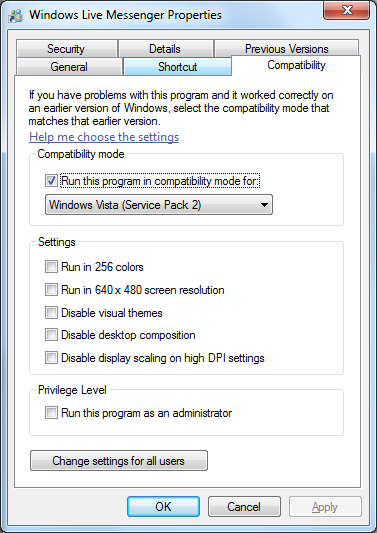
That is all you will have to do. In the future the MSN icon will be back where it belong in the system tray

Download Windows Live Messenger 2011
Update: June 2013
Windows Messenger will no longer be supported by Microsoft. Instead users will be upgraded to Skype.
Windows Messenger End of Life